The short answer
WebAR posters are printed posters, flyers, packages, banners, or signs that launch an augmented reality experience from a QR code, link, or image target. The user opens the experience in a mobile browser, sees AR content through the camera, and can then tap a clear next step such as book, buy, register, request a quote, view a tour, or save a link.
They work best when the printed material already gets attention but cannot explain enough on its own. A poster can attract the glance. WebAR can show the product, reveal a character, open a 3D model, start a mini demo, guide a visitor, or connect the offline moment to a measurable digital funnel.
The strongest first build is not a giant AR platform. It is one poster, one scan path, one AR reveal, one interaction, and one conversion action.
Do not make the poster interactive unless the next action is clear.
A WebAR poster should not only feel interesting for a few seconds. It should help the visitor understand something faster, remember the brand, and take the next step.
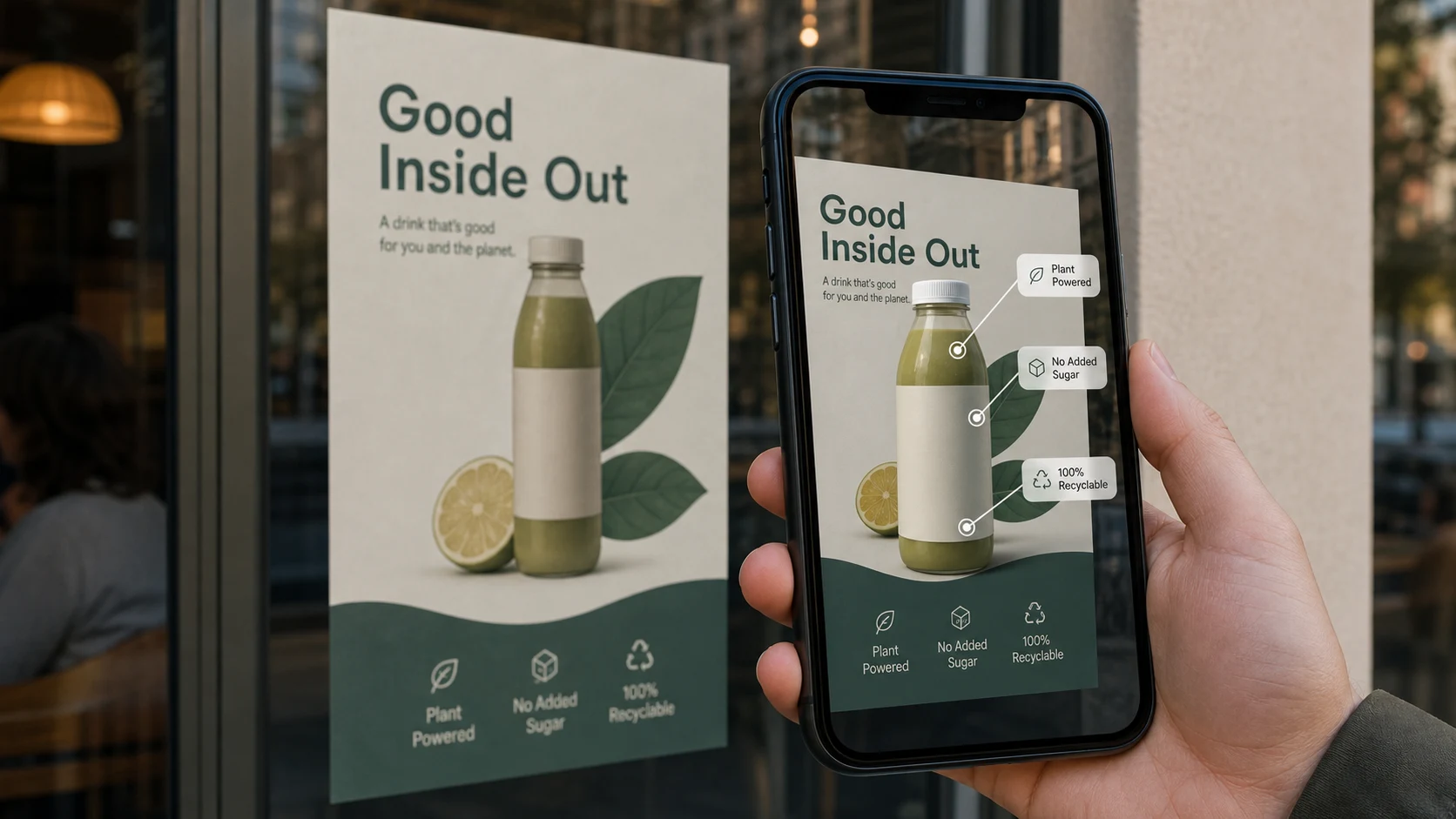
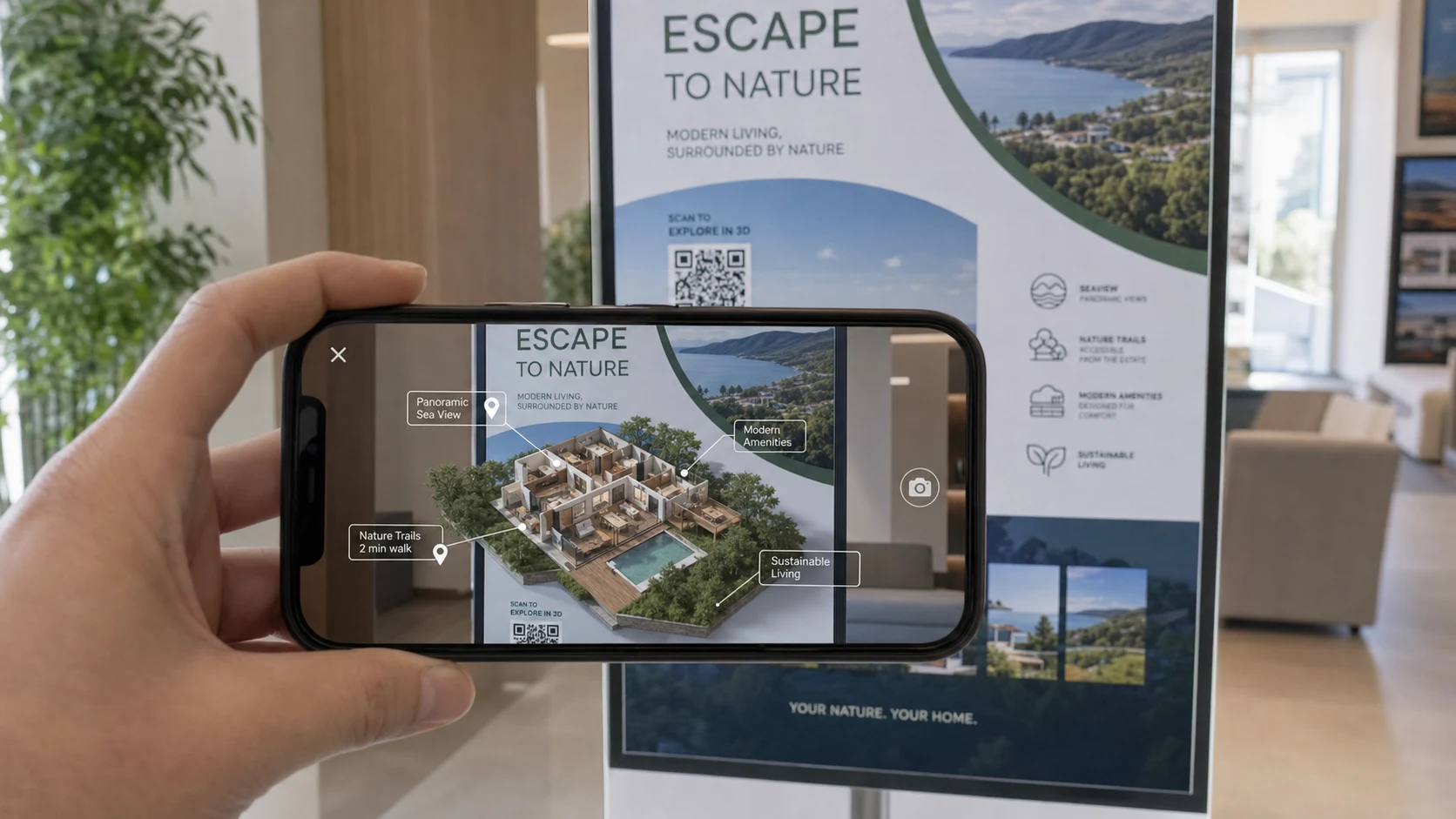
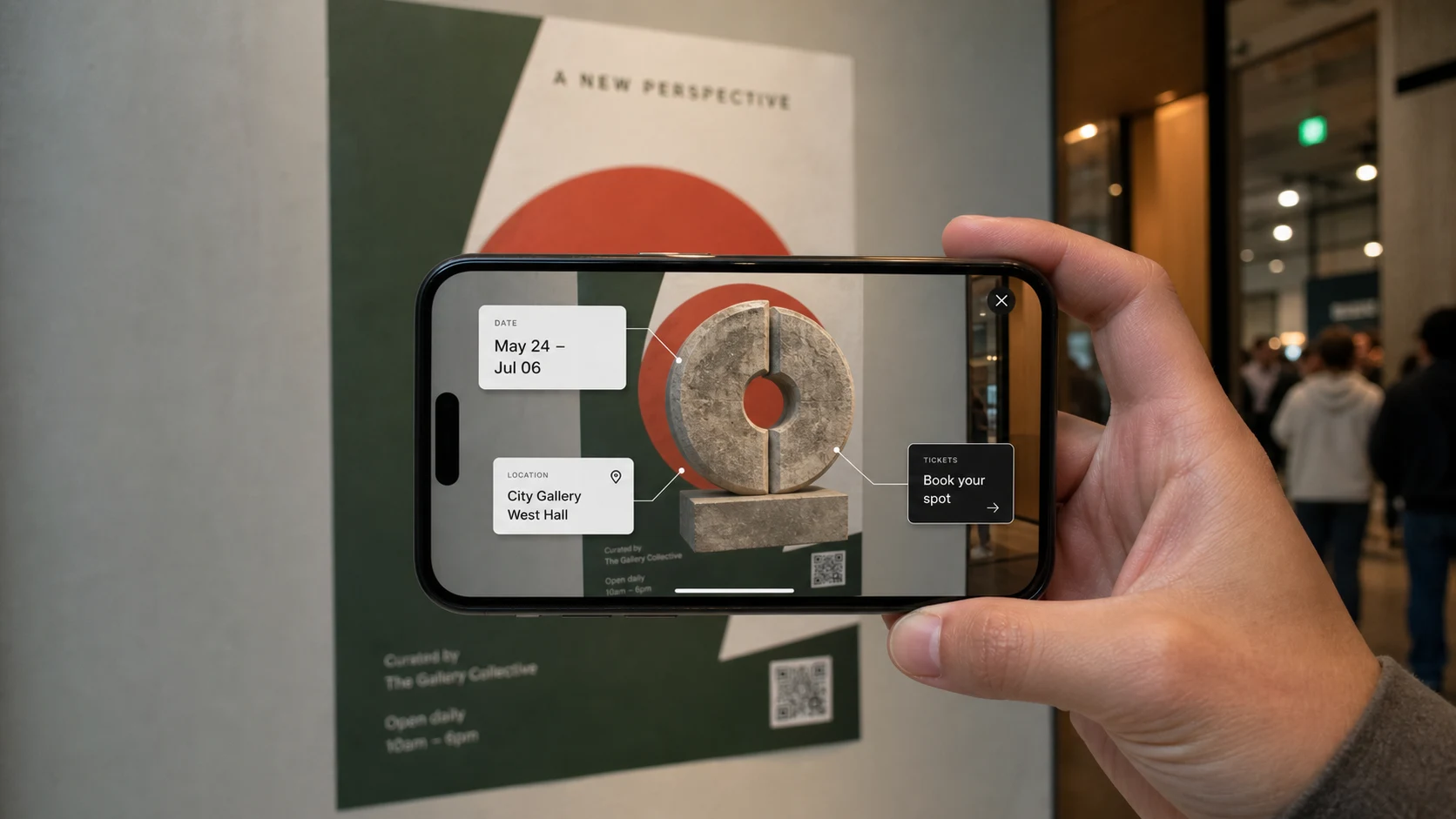
Augmented reality posters for events, real estate, retail, and museums
The strongest augmented reality posters are not built around novelty. They are built around a specific offline moment where the visitor needs more context before acting.
Events
Use a poster or booth sign to reveal a schedule, sponsor activation, speaker intro, event map, ticket offer, or shareable branded moment.
Real estate
Use a property board or flyer to open a 3D preview, 360 tour, floor plan, neighborhood guide, or book-a-viewing path.
Retail and product launches
Use a shelf display, launch poster, or package insert to show product scale, color variants, feature labels, or a buy-now CTA.
Museums and education
Use labels, hallway posters, or printed guides to reveal artifact stories, historical scenes, quizzes, audio prompts, or donation actions.
What is a WebAR poster?
A WebAR poster is a physical print asset that opens an augmented reality experience on a phone. The entry point is usually a QR code, short link, NFC tap, or image-based trigger. The AR content can be a 3D product, animated mascot, virtual guide, product label, event map, mini game, room preview, or branded scene.
The key difference from a normal QR poster is what happens after the scan. A normal QR code sends the visitor to a web page. A WebAR poster sends the visitor into an interactive camera experience that can still include normal web actions such as booking, lead capture, ecommerce, downloads, or contact forms.
For many campaign uses, WebAR is useful because the visitor does not need to install a custom app before seeing the experience. That makes it practical for events, posters, flyers, restaurant tables, retail displays, museum labels, real estate boards, and cold outreach material.
AR poster vs QR code poster
A QR code alone is not the strategy. The strategy is what the visitor sees after scanning.
| Option | Best fit | Limit |
|---|---|---|
| Static poster | Awareness, simple announcements, brand visibility, wayfinding, and low-cost print campaigns. | The interaction ends at reading. It cannot demonstrate, personalize, or track deeper engagement well. |
| QR code poster | Sending people to menus, ticket pages, property listings, brochures, forms, coupons, or landing pages. | Useful but familiar. It may not create much memorability unless the destination page is strong. |
| WebAR poster | Campaigns where the product, place, story, character, exhibit, offer, or 3D object benefits from a camera-based reveal. | Needs mobile performance planning, clear creative direction, device testing, and a non-AR fallback. |
WebAR poster ideas by industry
The best WebAR poster ideas connect the printed location to a real decision moment.
Events and conferences
A poster can launch an AR schedule preview, sponsor reveal, speaker intro, venue map, booth scavenger path, ticket CTA, or shareable photo moment.
Real estate and property marketing
A board, flyer, or brochure can open a 3D property preview, 360 tour link, floor plan hotspot, neighborhood map, or book-a-viewing CTA.
Museums, schools, and cultural sites
A label or hallway poster can reveal an artifact story, historical reconstruction, character guide, quiz, audio prompt, or donation/membership action.
Product launches and retail
A shelf display or launch poster can show a 3D product, feature animation, size comparison, color variant, usage demo, or buy-now path.
Restaurants and local businesses
A table tent, window poster, or flyer can reveal menu items, limited offers, branded characters, loyalty prompts, booking links, or seasonal campaigns.
Recruitment and education campaigns
A campus poster or training flyer can open a short interactive story, facility preview, course module, application CTA, or onboarding experience.
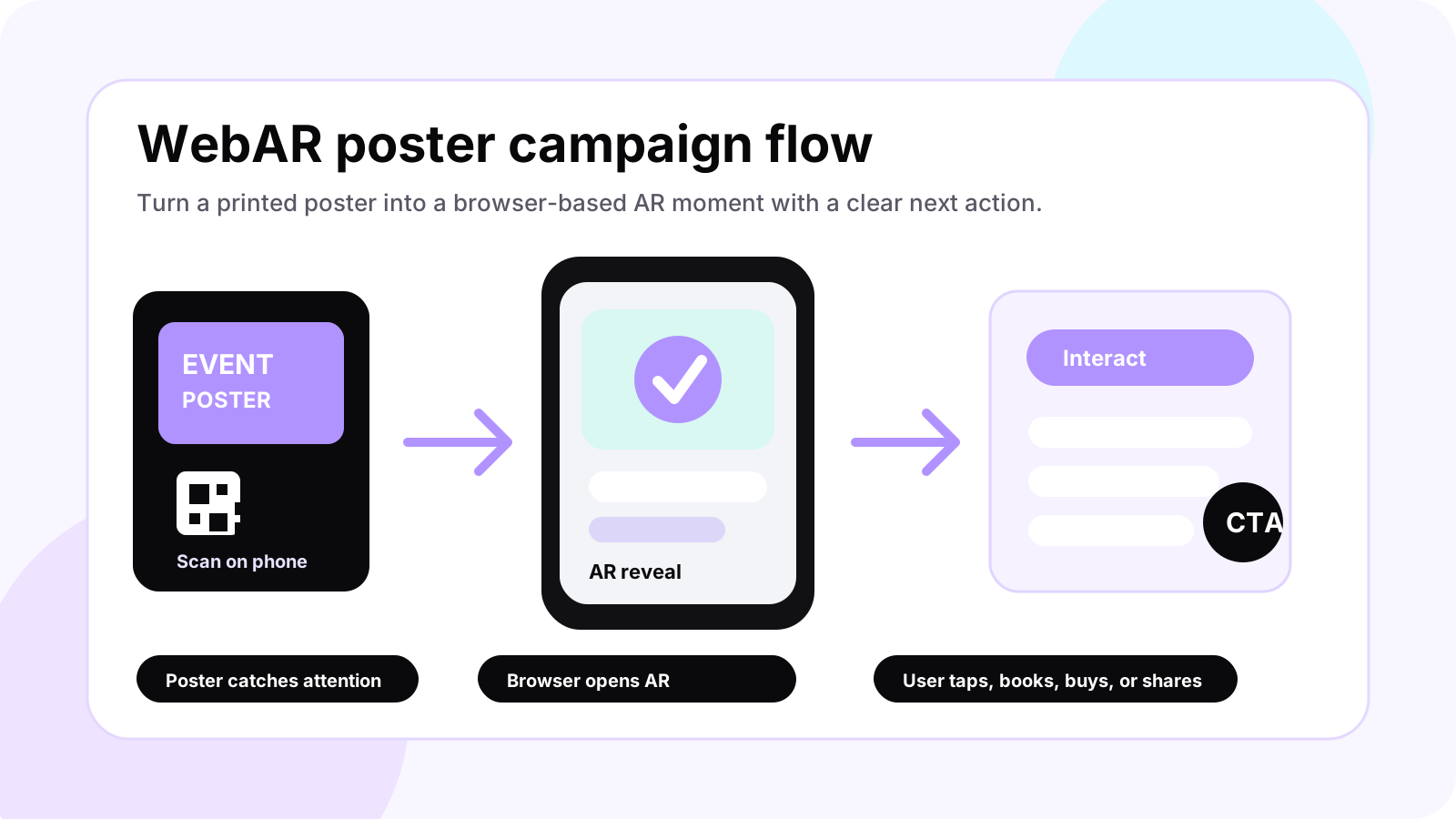
Campaign funnel for WebAR posters
Use the poster as the top of the funnel, not the whole funnel.
| Step | What the user does | What the business measures |
|---|---|---|
| Notice | Sees a poster, flyer, label, sign, booth graphic, or printed product display. | Location, placement quality, print visibility, and campaign context. |
| Scan | Uses a QR code or short link to open the mobile experience. | Scan count, source code, location, device class, and landing load success. |
| Experience | Views the AR reveal, taps hotspots, rotates a model, follows a guide, or plays a small interaction. | Engagement events such as started AR, taps, time in experience, and completion. |
| Convert | Books a call, buys a ticket, saves a coupon, opens a tour, joins a list, downloads a guide, or requests a quote. | CTA clicks, form submissions, bookings, ecommerce actions, or qualified leads. |
| Follow up | Receives a saved link, email, WhatsApp message, retargeting path, or sales follow-up. | Lead quality, campaign attribution, repeat opens, and sales handoff. |
What the AR reveal can include
A first WebAR poster should use a focused interaction that makes sense in the visitor's physical context.
3D product preview
Show a product at scale, rotate it, expose features, or place it in the user's space when the device and browser path support it.
Animated brand character
Use a short character moment for events, schools, restaurants, entertainment campaigns, kids products, or brand storytelling.
Interactive information layer
Add tappable labels, hotspots, comparison points, audio prompts, or guided steps that explain the offer better than the poster can.
Mini game or challenge
Create a simple tap, collect, quiz, puzzle, or reward mechanic for campaigns where dwell time and sharing matter.
360 tour or virtual showroom link
Let a poster become the entry point to a property tour, museum route, hotel walkthrough, showroom, or product experience.
Lead capture or booking path
Connect the AR moment to a practical CTA: book a visit, claim an offer, request a quote, buy tickets, contact sales, or join a list.
WebAR poster design rules
Most weak AR posters fail because the print, scan flow, and mobile experience were designed separately.
- Make the QR code large enough for the viewing distance and keep it away from folds, glare, and visual clutter.
- Use a short instruction near the code, such as Scan to view in AR, Scan to see the product, or Scan to unlock the event map.
- Send users to a mobile-first landing path with fast loading, clear camera permission copy, and a fallback if AR is not supported.
- Keep the first AR moment simple. Heavy models, long loading screens, and tiny labels will lose users before they understand the value.
- Use strong contrast and recognizable artwork if the experience depends on image or marker tracking.
- Plan the CTA before the artwork is final. The AR reveal should lead naturally to a booking, quote, purchase, tour, signup, or share.
- Test the printed piece in real lighting, real distance, real phones, and the actual placement where people will scan it.
What you get in a first WebAR poster prototype
This is the practical starter package: enough to test the campaign, review the user flow, and decide whether to expand.
| Deliverable | Good first version | Why it matters |
|---|---|---|
| Poster direction | One poster, flyer, label, package face, booth sign, or display-board concept. | Keeps the campaign context specific instead of designing for every print format at once. |
| QR entry flow | One QR code or short link with a mobile-first landing route and clear camera-permission copy. | Proves whether users can reach the AR moment quickly. |
| AR reveal | One 3D model, animation, guide, hotspot layer, or mini interaction. | Shows whether AR adds value beyond a normal landing page. |
| Interaction design | One simple action such as tap a hotspot, rotate a model, reveal a label, play a short animation, or claim an offer. | Keeps the experience understandable in the first few seconds. |
| Conversion CTA | One CTA: book, buy, register, request a quote, open a tour, save offer, or contact sales. | Connects the creative moment to a business outcome. |
| Launch check | A short device, print, loading, fallback, and CTA QA pass on likely iOS and Android phones. | Reduces launch risk around camera permissions, loading, scanning, lighting, and fallback behavior. |
Start with one poster and one useful AR moment.
For most businesses, the right first step is a focused WebAR poster prototype: one print concept, one AR scene, one mobile journey, and one measurable CTA.
Technology options for WebAR posters
The practical recommendation is simple: choose the lightest WebAR stack that can support the campaign goal, target devices, tracking needs, and analytics requirements.
For simple 3D product viewing, a web model viewer with optimized GLB and USDZ assets may be enough. For more custom camera experiences, teams often use WebXR, Three.js, PlayCanvas, A-Frame, Needle, MindAR, AR.js, Zappar, 8th Wall, or another WebAR stack depending on tracking, reach, budget, and licensing needs.
The technology should follow the campaign goal. A product preview does not need the same stack as a marker-tracked museum label, an event scavenger hunt, or a branded character animation. The decision should consider iOS and Android coverage, camera permissions, load time, analytics, tracking reliability, 3D asset complexity, and fallback behavior.
The safest promise is not that every phone will support every AR feature perfectly. The safer build plan is to test the target devices, provide a non-AR fallback, keep the first interaction lightweight, and avoid advanced features unless the campaign truly needs them.
Common mistakes to avoid
These are the issues most likely to make visitors scan once and leave.
No reason to scan
If the poster does not tell users what they will get, many people will ignore the QR code.
Slow first load
Large models, uncompressed textures, and heavy scripts can kill the experience before AR starts.
Weak CTA
A memorable AR reveal still needs a next step. Otherwise the campaign becomes a novelty instead of a funnel.
Bad print placement
A beautiful poster will underperform if the QR code is too small, too low, too reflective, hidden by crowds, or placed where people cannot stop.
Overbuilt interaction
A first WebAR poster should not ask users to learn controls. The best interactions are obvious in the first few seconds.
No fallback
Some devices, browsers, lighting conditions, or permission choices will fail. The page still needs a useful non-AR route.
Where Xentoro fits
Xentoro Studio can help plan and build WebAR posters from the campaign idea to the working prototype. That includes the user journey, AR concept, 3D asset plan, mobile UX, QR entry path, landing page, fallback, analytics events, and conversion CTA.
The best starting point is a small campaign with a clear business goal. For example: one event poster that drives ticket sales, one real estate sign that opens a property preview, one museum label that explains an exhibit, one product launch poster that shows a 3D model, or one restaurant display that reveals an offer.
Once the prototype works, the same pattern can expand into multiple posters, locations, products, languages, campaign variants, and deeper AR or native app experiences.
FAQs about WebAR posters
What are WebAR posters?
WebAR posters are printed posters, flyers, signs, labels, or packages that open an augmented reality experience through a mobile browser, usually from a QR code, link, or image trigger. They let users interact with AR content without installing a dedicated app first.
How is a WebAR poster different from a QR code poster?
A QR code poster usually sends users to a normal web page. A WebAR poster uses the scan as the entry point to a camera-based AR experience, such as a 3D product, animated guide, hotspot layer, mini game, tour preview, or interactive campaign scene.
Do WebAR posters need an app?
Usually no. WebAR posters are designed to open in a mobile browser. Some advanced AR features still depend on browser, device, and SDK support, so a good campaign should include device testing and a non-AR fallback.
What businesses can use augmented reality posters?
WebAR posters can work for events, real estate, museums, restaurants, retail, product launches, schools, tourism, entertainment, recruitment, packaging, and local marketing. The best use cases are campaigns where a 3D, animated, or interactive layer helps people understand or act faster.
What should a first WebAR poster prototype include?
A first prototype should include one print concept, one QR or link entry path, one AR reveal, one simple interaction, one fallback page, and one measurable CTA such as book, buy, register, request a quote, open a tour, or contact sales.
Can WebAR posters track campaign results?
Yes. A WebAR poster can track web-style events such as scans, page loads, AR starts, hotspot taps, CTA clicks, form submissions, and location-specific QR variants. Tracking should be planned with privacy, consent, and analytics requirements in mind.
What should I send to start a WebAR poster project?
Send the poster, flyer, product, venue, campaign goal, target audience, and the action you want users to take after scanning. From there, a first prototype can define the QR flow, AR reveal, fallback page, and conversion CTA.
Build a focused WebAR poster prototype before a full campaign.
Send the poster, product, venue, or campaign goal. Xentoro can shape one QR flow, one AR reveal, one interaction, one CTA, and a mobile QA pass around it.