Why DME products are hard to explain with static content
Durable medical equipment is often sold, delivered, assembled, adjusted, and supported outside a showroom. A buyer may need to understand whether a hospital bed fits a room, how a wheelchair should be inspected, or where the main parts of a respiratory device are before a support call even begins.
Photos, PDFs, and phone calls can help, but they force users to translate flat instructions into a real space. That creates friction for customers, caregivers, staff, and support teams. A custom augmented reality app can make that explanation more visual, guided, and repeatable.
For a digital services business, this does not require a local office in every market. A remote AR development team can design, prototype, and test the medical device training workflow with your approved content, product assets, and target devices.
AR should make approved guidance easier to see, not replace it.
For DME products, the app experience should be built from approved product instructions, support policies, and reviewed setup content. The AR layer helps users see the guidance in context while your team keeps control of the message.
Where a DME AR app can reduce confusion
A focused AR experience works best when it supports practical decisions and repeatable training moments.
Room fit before delivery
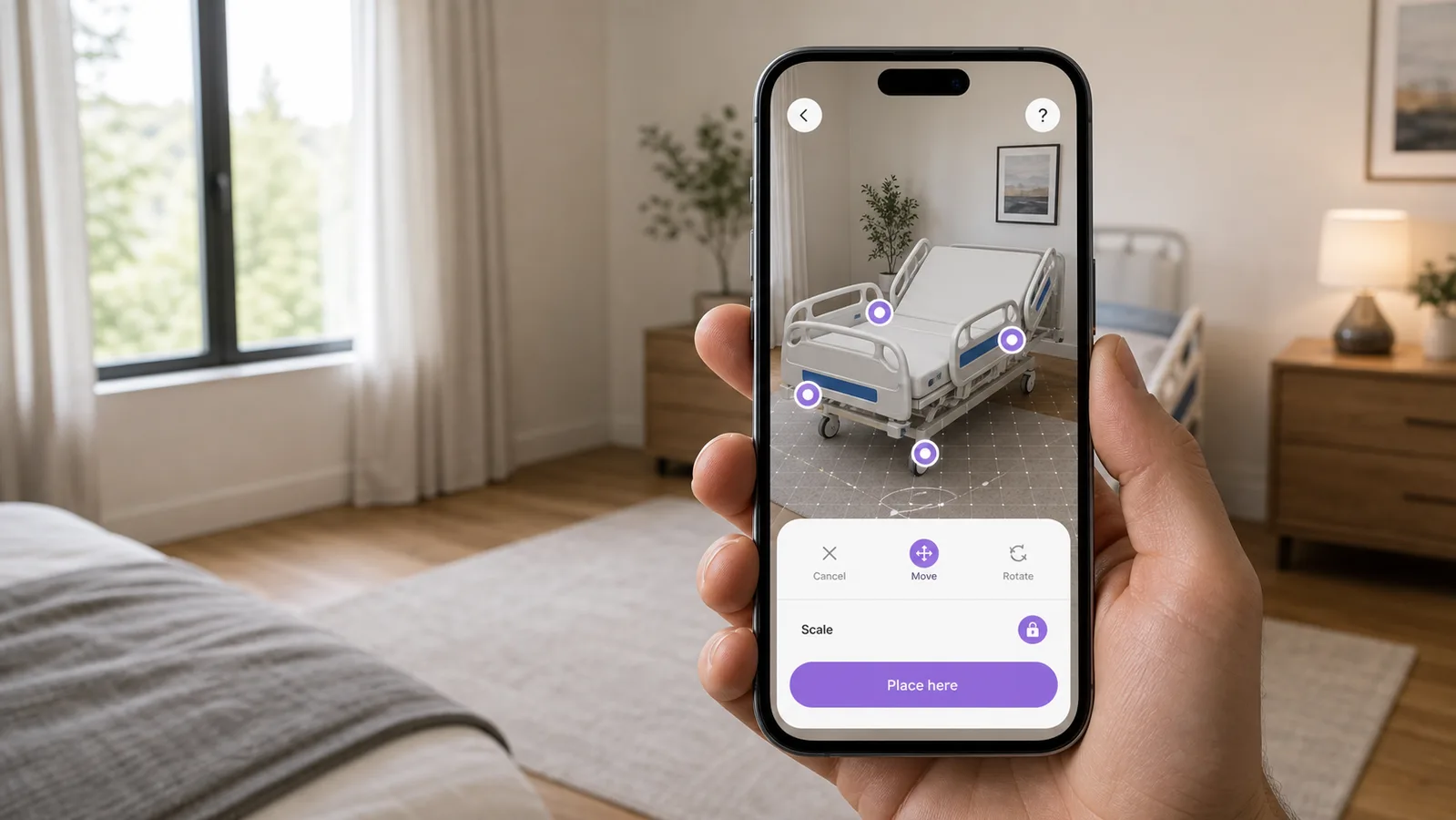
A customer, sales rep, or delivery team can preview equipment at approximate real-world scale before the product arrives.
Guided setup steps
AR hotspots, short checklists, and simple animations can make approved setup guidance easier to follow than a static page.
Part identification
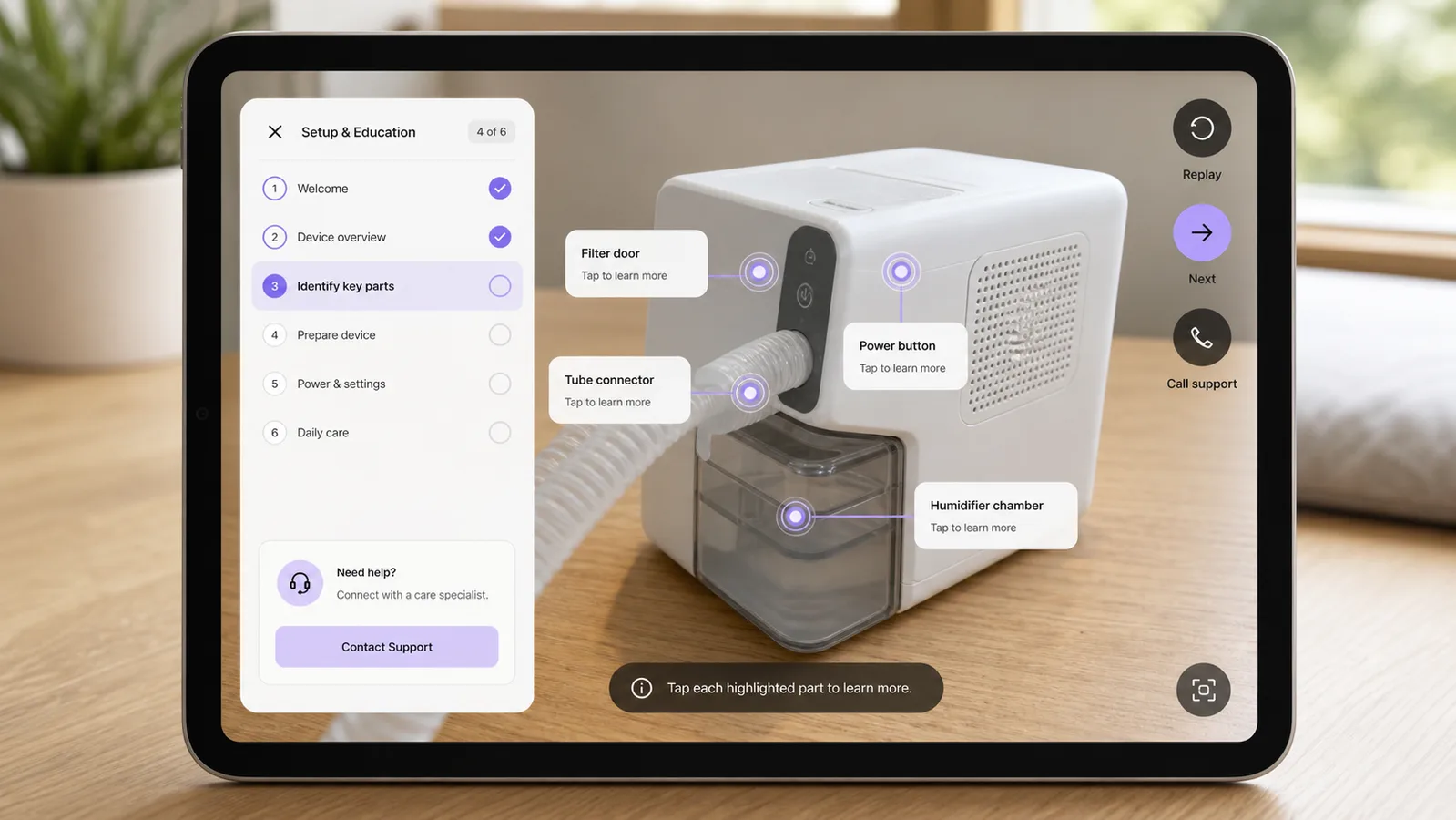
Users can tap highlighted areas to understand controls, filters, rails, wheels, tubing, cushions, or accessories.
Staff and caregiver training
A mobile training mode can replay product walkthroughs for repeated learning without needing a trainer in the room every time.
Support and inspection workflows
Support teams can guide users through visual checks and collect clearer context before deciding what help is needed next.
What the DME AR mobile app experience could look like
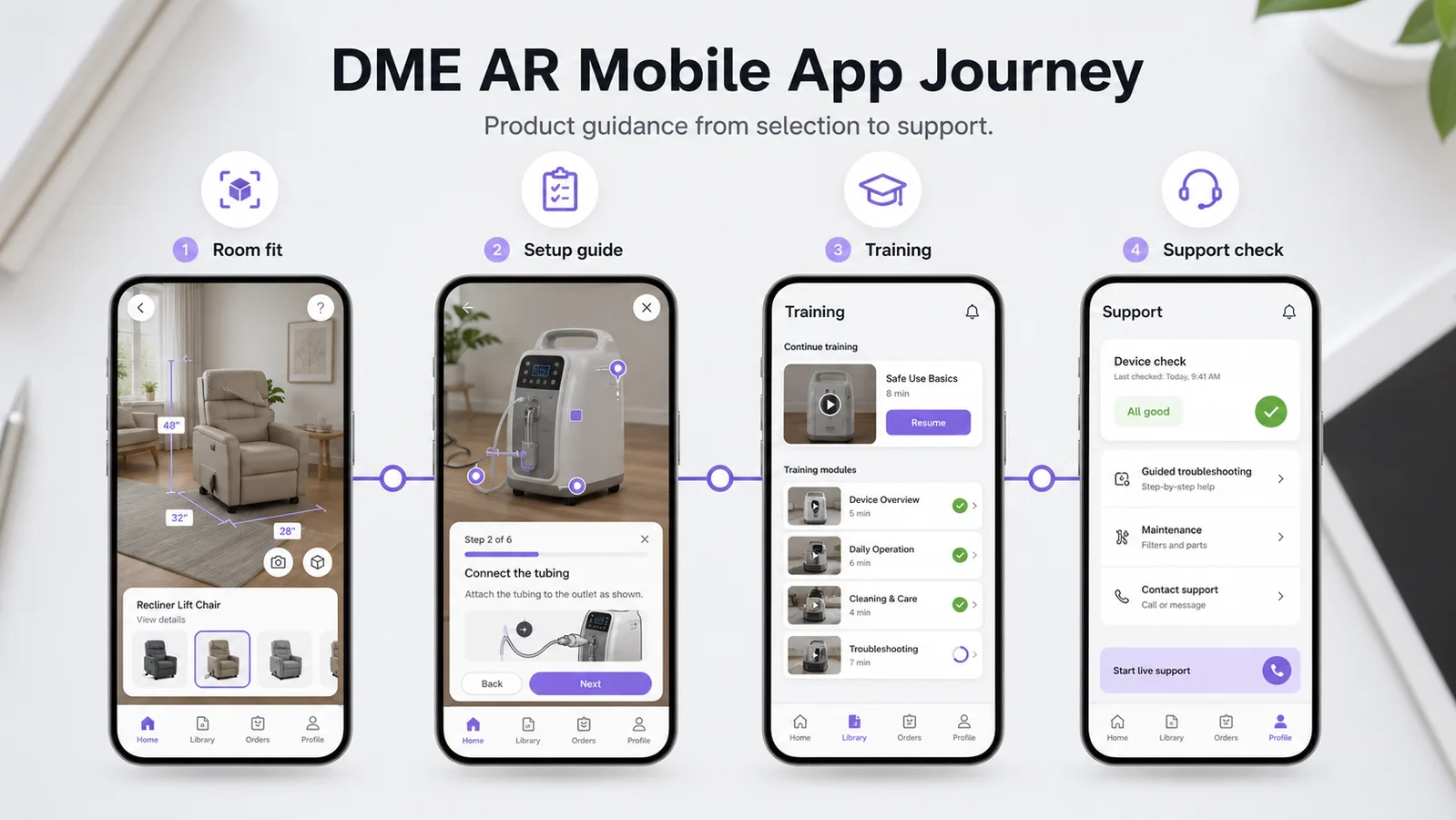
These examples show a custom native app direction: no QR campaign flow, no generic viewer, and no private client concept language.
Preview equipment in the actual room
A hospital bed, lift chair, walker, or similar product can be placed in a live camera view so the user understands scale, clearance, and positioning before delivery or setup.
Turn approved instructions into guided steps
A setup mode can highlight parts, show short step progress, and let users replay product education content without hiding the real device.
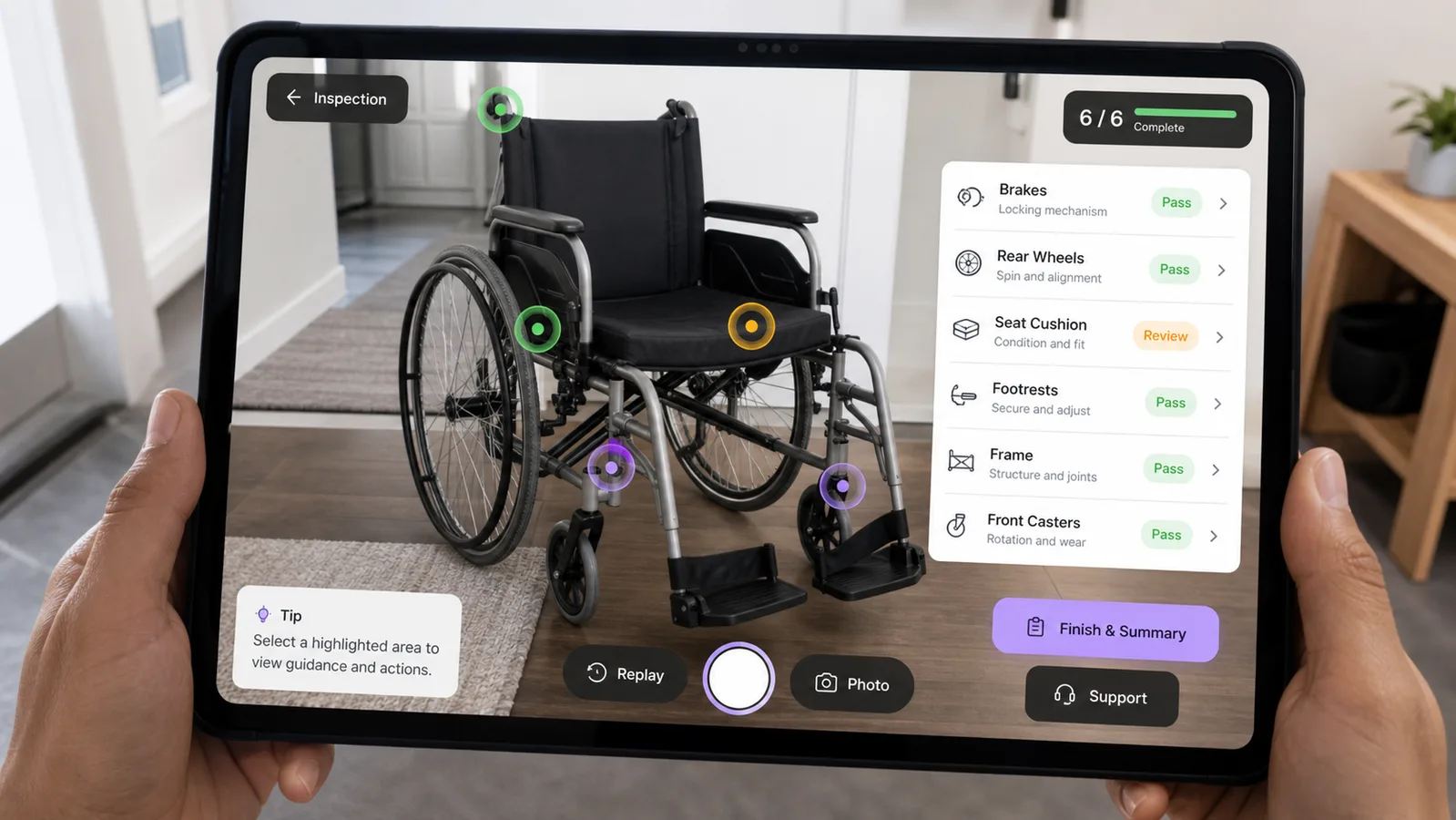
Make inspection workflows easier to follow
For wheelchairs and other equipment with visible components, the app can guide users through inspection areas, status checks, photos, and support handoff.
DME use cases by equipment type
The first prototype should focus on one product and one user problem before expanding into a full platform.
| Equipment type | Useful AR workflow | Business value |
|---|---|---|
| Hospital beds | Room placement, clearance checks, rail and control labels, delivery planning. | Helps buyers and teams understand fit before setup. |
| Wheelchairs | Part identification, brake and wheel checks, cushion notes, photo capture for support. | Makes inspection and support conversations more visual. |
| Oxygen devices | Approved setup guide, part labels, filter and tubing education, support handoff. | Turns repeated explanations into a guided mobile workflow. |
| CPAP devices | Device overview, accessory labels, cleaning reminders, training modules. | Supports repeatable education without relying only on printed instructions. |
| Walkers and lifts | Height, clearance, folding points, adjustment areas, setup checklist. | Helps users understand configuration and basic product handling. |
First prototype package
A first DME AR prototype should feel concrete, not endless. The best starting point is one product, one repeated explanation, and one workflow your team already handles often: room fit, product setup, part identification, staff training, or support checks.
A practical starter package can include one realistic 3D equipment model, three mobile AR screens, one guided workflow, tap-to-learn hotspots, approved copy placeholders, basic replay controls, and a short testing pass on target phones or tablets.
That gives a DME company something useful to review with sales, support, training, and compliance stakeholders before planning a larger medical equipment training app or AR support app.
What the prototype scope can include
This keeps the first build small enough to approve, test, and explain in a sales or support meeting.
| Prototype item | Included direction | Why it helps |
|---|---|---|
| 1 product | Hospital bed, wheelchair, oxygen device, CPAP, walker, lift, or another high-priority DME item. | Keeps the project focused on a real workflow instead of a broad app idea. |
| 3 AR screens | Room fit, setup guide, and support or inspection view. | Shows the buyer journey without building the full platform first. |
| 1 guided workflow | A short approved sequence with hotspots, step states, and replay support. | Makes the AR value easy for non-technical stakeholders to understand. |
| Device test pass | Review on representative iOS or Android devices used by the target audience. | Catches usability and performance issues before expansion. |
Build one useful AR workflow before planning the full app.
Tell us the equipment type and the workflow you want to prototype. We can help shape it into a focused AR product visualization, setup, or support app concept.
Relevant AR capabilities behind the build
A DME AR app needs more than a 3D model. It needs product UX, mobile AR engineering, visual clarity, and a careful content workflow.
Unity AR app development
Cross-platform AR builds can use a shared Unity workflow for native iOS and Android prototypes when deeper app behavior is needed.
ARKit and ARCore testing
Room placement, tracking, camera permissions, and device performance need to be tested on representative phones and tablets.
3D model preparation
Equipment models need clean scale, optimized geometry, readable materials, and mobile-friendly performance.
Training and support UX
The app flow should make setup, inspection, support, and training steps easier to follow without overwhelming the user.
Planning checklist for DME companies
Before commissioning an AR medical equipment training app, prepare the inputs that affect scope, accuracy, and launch risk.
- Choose the first product: hospital bed, wheelchair, oxygen device, CPAP, walker, lift, or another DME item.
- Define the primary user: buyer, caregiver, delivery staff, sales rep, support team, or internal trainer.
- Select the first workflow: room fit, setup guide, part identification, training module, inspection, or support handoff.
- Provide approved product instructions, support scripts, media, and any required compliance language.
- Decide whether the app needs native iOS/Android features, offline use, accounts, analytics, or app-store release.
- Plan a device test matrix for the phones and tablets your customers or team actually use.
Compliance-safe AR matters
A DME AR app should support education, product visualization, setup guidance, and support workflows. It should not invent instructions, replace professional advice, or make unverified clinical promises.
For medical-device-related content, final copy and workflows should be reviewed against the client's approved instructions, support policies, regulatory requirements, and product documentation. The AR layer should make the approved guidance easier to see and repeat, not change the guidance itself.
That is why the best AR build process starts with content review, user flow design, and a limited prototype before adding more products or deeper app features.
How Xentoro can help
Xentoro Studio can help a medical device or DME company turn one equipment workflow into a custom AR prototype: concept planning, mobile UI design, 3D model preparation, Unity AR Foundation development, ARKit and ARCore testing, interaction design, and launch support.
The work can start small: one product, three AR screens, one training or support flow, and a clear prototype review. Once the prototype is validated, the app can grow into a larger product library, staff training system, customer education tool, DME sales app, or support companion.
Because this is a digital service, the workflow can be planned remotely for teams in the United States, Europe, the Middle East, and other markets as long as the product documentation, review process, and device testing expectations are clear.
FAQs about AR medical device training
How can augmented reality help durable medical equipment companies?
Augmented reality can help DME companies show equipment at approximate real-world scale, guide users through approved setup content, identify product parts, support staff training, and make support conversations more visual.
Is a DME AR app better as WebAR or a native mobile app?
A native mobile app is usually better when the experience needs repeat use, accounts, offline access, deeper training modules, stronger device integration, or app-store distribution. WebAR can work for lighter no-install demos.
What DME products can use AR visualization?
Possible DME AR use cases include hospital beds, wheelchairs, oxygen devices, CPAP devices, walkers, lifts, monitors, and other equipment where scale, setup, parts, or inspection steps are easier to understand visually.
Can AR replace medical instructions or professional support?
No. AR should support approved education, setup, and support workflows. It should not replace professional advice, approved product documentation, or required clinical guidance.
What is the best first step for a DME AR prototype?
Start with one product and one repeated problem, such as room fit, guided setup, part identification, staff training, or support checks. A focused prototype is easier to test before expanding into a full product library.
Plan a small AR prototype around one real equipment workflow.
Xentoro can turn one DME product, setup flow, or inspection checklist into a mobile AR prototype before you invest in a larger platform.